Segura® is a security platform composed of software, an operating system, and hardware. This modularized platform meets the most stringent security standards in the industry.
In this document, we will cover the main technical aspects of Segura®.
System modules architecture
The Segura® software solution is divided into the following modules:
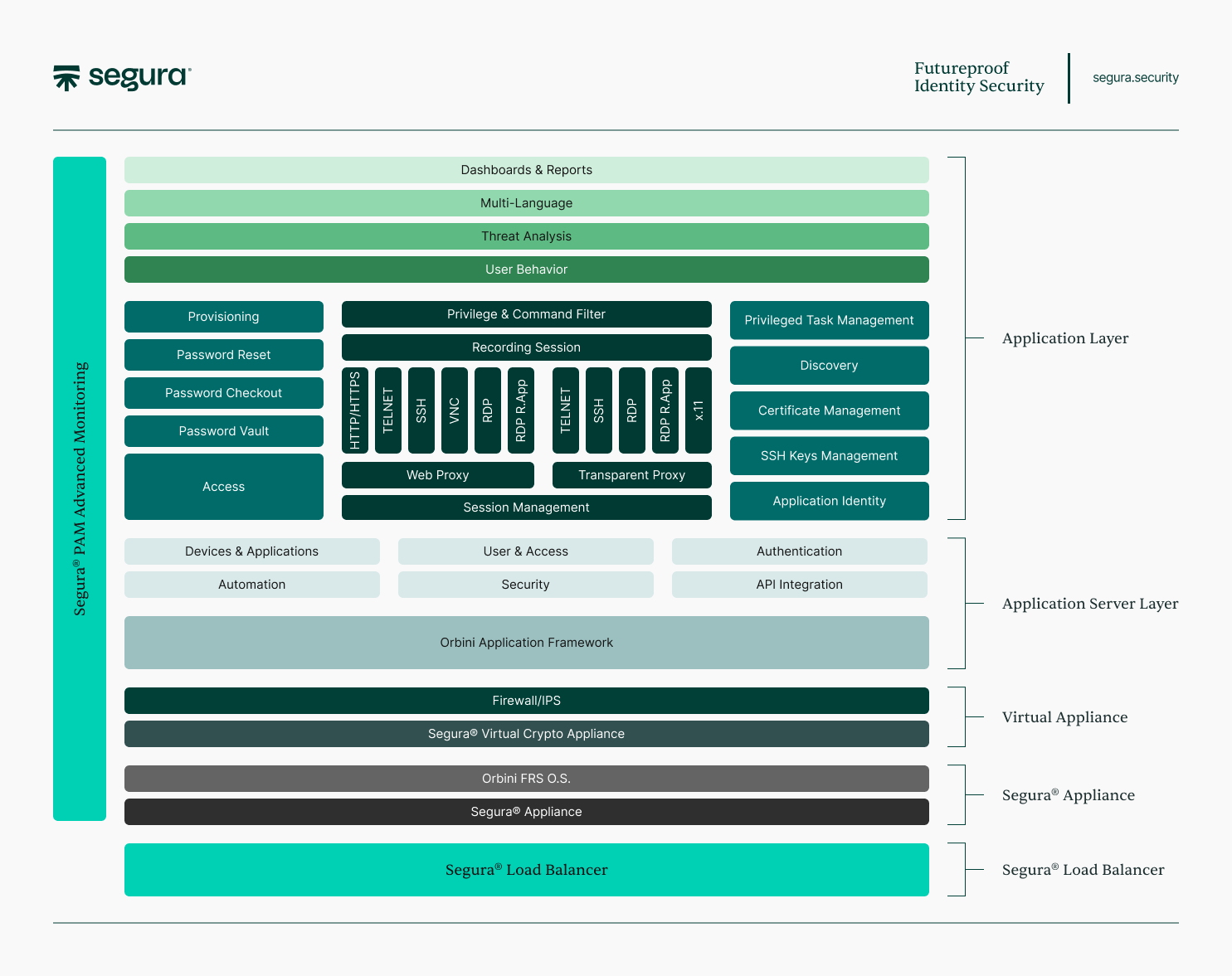
These components support the operation of the Segura® from the physical layer to the application layer.
- Business layer: where all Segura® features are located, from integrations to activity recording.
- Application server layer: where Orbini is located, MT4 developed a framework to support all solution features.
- Virtual appliance: a virtual device where the solution is executed.
- Appliance layer: Segura® hardware solution.
Basic systems solution components
In addition to the modules presented, the solution has essential embedded software components integrated into the solution itself without the need for external resources:
- Optimized and hardened overall aspects (Application, database, File System, etc.) Linux-based operating system. The system has only the minimum services running, obeying the Minimum Privilege Principle, and a kernel adapted to the solution's functionality.
- Own database; no license required.
- Own and integrated web server.
- Embedded web interface, no licenses or additional features to use. With just a single network configuration interface, it is already possible for the deployer to have access to the HTTPS web interface so that all other configurations can be performed in a secure and user-friendly graphical environment.
Ports
On virtual and physical appliances in Segura®, only service ports are released:
| Protocol/Port | Function |
|---|---|
| TCP/22 | SSH Server |
| TCP/80 | Web Server with redirection to 443 |
| TCP/443 | Web Application Server |
| UDP/161 | SNMP |
| UDP/162 | SNMP |
| TCP/3389 | RDP Proxy |
| TCP/3306 | Database cluster |
| TCP/4444 | Database cluster |
| TCP/4567 | Database cluster |
| TCP/4568 | Database cluster |
| UDP/4567 | Database cluster |
| TCP/51445 | Segura® Network Connector |
| TCP/5432 | DB Proxy PostgreSQL |
| TCP/1433 | DB Proxy MS SQL |
| TCP/2484 | DB Proxy Oracle TCP |
| UDP/2484 | DB Proxy Oracle UDP |
Language
Beta language users may encounter misspellings, typos, and words in another language like English. Translation errors can be reported via the Support PAM Solution.
The solution has all interfaces in the following languages:
| Language | Code |
|---|---|
| Brazilian Portuguese | PT-BR |
| United States English | EN-US |
| German | DE |
| Spanish | ES |
| Polish | PL |
| French | FR |
| Russian | RU |
The solution allows user input and storage using UTF-8 charset:
| # | Script/Language Name |
|---|---|
| 1 | Arabic |
| 2 | Arabic Extended-A |
| 3 | Arabic Extended-B |
| 4 | Arabic Mathematical Alphabetic Symbols |
| 5 | Arabic Presentation Forms-A |
| 6 | Arabic Presentation Forms-B |
| 7 | Arabic Supplement |
| 8 | Basic Latin |
| 9 | Bopomofo Extended |
| 10 | CJK Compatibility |
| 11 | CJK Strokes |
| 12 | CJK Symbols and Punctuation |
| 13 | CJK Unified Ideographs |
| 14 | CJK Unified Ideographs |
| 15 | CJK Unified Ideographs Extension B |
| 16 | CJK Unified Ideographs Extension C |
| 17 | CJK Unified Ideographs Extension D |
| 18 | CJK Unified Ideographs Extension E |
| 19 | CJK Unified Ideographs Extension F |
| 20 | Cyrillic |
| 21 | Cyrillic Supplement |
| 22 | Enclosed CJK Letters A |
| 23 | French |
| 24 | Hangul Compatibility J |
| 25 | Hebrew |
| 26 | Hiragana |
| 27 | Kanbun |
| 28 | Katakana |
| 29 | Katakana Phonetic Exte |
| 30 | Latin Extended-A |
| 31 | Latin-1 Supplement |
| 32 | Syriac |
| 33 | Syriac Supplement |
| 34 | Russian |
| 35 | Yijing Hexagram Symbol |
Manuals
The solution has user manuals in the following languages:
- Brazilian Portuguese (PT-BR).
- United States English (EN-US).
Segura® enables organizations to deploy the most stringent and complex privileged credential access controls required by standards such as ISO 27001, PCI, SOX, GDPR, and PQO by automating privileged access controls, protecting the IT park from data breaches and potential compliance violations.
Hardening
Hardening reduces the attack surface on a system by changing default passwords, removing unnecessary software, removing unuseful users or logins, and disabling or removing unnecessary services.
Segura® uses a series of hardening processes at different levels of application and its components, recognized by the security market, to mitigate attempted attacks.
Among other models, Segura® uses hardening processes indicated by NIST (National Institute of Standards and Technology) and CIS (Centro de Internet Security, Inc.).
The hardening process is periodically reviewed with each new release of the solution so that it is always in compliance with the best practices and the main security processes adopted by the market.
Component update
Segura®'s Research and Development team is aligned with updates to the third-party components that make up the solution. Updating these components is done through a fast communication channel, and it is performed on customers if a critical demand is released.
The tool update process is aligned with the client's update policy. In this case, a team will be deployed to fulfill the installation flow with the least risk of impact on the customer's business.
Functional features by modules
The Segura® doesn't allow the installation of other software.
Base Module - System access settings
This module has the following functions:
- Segura® Authentication: Segura® has its authentication module with functionality that implies user blocking after a determined amount of unsuccessful login attempts. Change the password in the first login, validating the complexity of the new password created with a comparison of the history of passwords used.
- User Registration: complete user registration with change and configuration traceability.
- Profile Management: advanced granular profile management with the ability to create according to each user profile.
- Screen's Log: system screen view log.
- Screen Identification by codes: each system screen is uniquely identified with a code, making service and support accessible.
- External Authentication Servers: in addition to its authentication module, Segura® can be used in conjunction with other directory services. You can set up Segura® to perform authentication across multiple servers, including establishing an authentication order. The central authentication servers that integrate with Segura® are Active Directory, LDAP, TACACS, TACACS+, and RADIUS.
- Two-Factor Authentication: you can reinforce the authentication process through Multi-factor authentication using, for example, the Google Authenticator application.
- IP Access Blocking: Segura® can block access through a pre-established IP denylist.
- Session Management: in the tool, the session management module is responsible for checking session validity and setting a timeout until the next login.
- Authentication with A1 and A3 Certificates: the authentication process can be carried out using A1 and A3 certificates as the second authentication factor.
- Single Active Session: Users cannot be logged in to the same Segura® account from two different sessions simultaneously. If authentication is performed using the Admin account while someone else is already logged in with the same Admin account, the person with the old session will be logged out.
Base Module - Password and information vault
This module is the core of the password vault and has the following functions:
- Password Guard: storing passwords in the vault, encrypted in the AES 256 algorithm with a double encryption factor. Passwords can only be accessed in this module through the Access Management module.
- Protected Information Guard: the password vault allows encrypted storage of information such as tokens, certificates, and files in general.
- Backup of Secrets: passwords, protected information, and SSH keys require an independent backup unit in the solution.
The information vault and passwords are responsible for writing the secrets to a backup encrypted by the Shamir algorithm-based master vault key.
- HSM Integration: Integration with external or internal Hardware Security Module devices
Base Module - Equipment register
This module is the password Segura® interface with the assets that will have their passwords managed and includes the following functions:
- Registration interface: where the equipment registration occurs, either by web screen individually or by the batch registration process.
- Connector management: each device has ports for connection and protocol for access. This module manages the configured connections and communicates with the devices.
- Connectivity test: periodically, Segura® will connect to registered devices and validate their connectivity. Users can be alerted of test results.
- Equipment profile: equipment types and models have default swap profiles and password templates in the tool. This module relates devices to these policies.
Base Module - Access to information, passwords, and session policies
The access policy module is the only one with access to the password and information vault and has the following functions:
-
Access workflow: the access workflow initiates an approval process for the delivery of the authenticated session or password. This process has different configurations and routes depending on the client configurations.
-
Access approvation: the access approval function allows the approving user to respond to the access request by:
- User screen.
- E-mail.
- SMS.
- Emergency Access.
-
Password split: this function breaks the password into two parts. For segmented delivery, and is relevant for PCI compliance.
-
Access control: the access control module unifies the three entities considered in the decision to surrender the credential or access:
- Delivery Policy.
- Involved Users.
- Related Equipment.
The joining of these entities defines the session delivery criteria in the system.
- User Timing: the access control module can be synchronized with an authentication server. Users of a particular group on the authentication server are loaded into the Segura® access groups, making access management easier.
Base Module - Reports
- Reporting Configuration: the user can remove or add information to a particular report through the interface. You can create a whole new view of helpful information for your needs.
- Shipping Schedule: the reports you create can be set to send to certain users automatically.
- PCI Reports: a set of specific reports to meet requirements required by PCI audits.
- Audit Trails: Segura® contains reports with all relevant system events. Events can be exported to SIEM and Syslog.
Base Module - Dashboards
-
System Health: responsible for graphically displaying the overview of Segura® hardware and Virtual Machines. You can view data such as I / O, memory, and processing.
-
Process Monitoring: monitors the execution of crucial vault processes:
* Password Changes
* Access Group Synchronisms
* Password Reconciliation
* Connectivity Tests
* Settings Backup
* Password's backup -
Business Monitoring: monitors health for credential and information protection:
- Number of Passwords changed x Failures
- By period
- Number of Sessions:
- Active and Concurrent x System Average
- Recorded (by period)
- Average session time logged in
- Users logged in to the system
Password change module
- SSH Password Change: make the connection and run the default password exchange script on the device using the SSH protocol without the need for agents installed.
- Windows Server: windows Password Exchange connects to a Windows server and runs local password exchange scripts without needing agents installed.
Using native Microsoft protocols (RPC, RM / WMI), Segura® can interact with the device using commands from the protocols or through PowerShell commands if protocol support is enabled.
- Network Asset: make the connection and run the default password exchange script on the device using the SSH protocol without the need for agents installed.
- Desktop: make the connection and execute the default exchange script for that password on that desktop using various desktop-based protocols.
- Database: make the connection and execute the default exchange script for that password in that database using the base protocol.
Password reconciliation module
Password reconciliations happen the same way on servers, network assets, desktops, and banks: accessing devices and accounts is periodically performed, trying to authenticate with the last password in custody, and validating whether custody remains under the password safe.
Proxy Session Management
Segura® doesn't handle constant changes in a user's originating IP address due to auditing and security reasons. If you're using a VPN that changes your IP often, it may cause frequent disconnections and require you to log back in. For a better experience, we recommend enabling session persistence in your VPN/network settings when accessing Segura®. This will keep your IP stable, avoiding unnecessary disconnections.
Management module - Windows sessions
- Session Delivery: authenticated session delivery is performed without entering a username or password.
- Session Recording: during access to the authenticated session, the system records the session in video and text.
- MP4 Video Generation: recorded video can be generated in mp4 format to be downloaded and uploaded.
- Audited Proxy Support: native audited proxy support for SSH and RDP connectivity of client applications. For compatibility between manufacturers, all proxy modules use current encryption algorithms and native protocols.
Management module - Linux sessions
- Linux Web Session Delivery: authenticated session delivery is performed without entering a username or password.
- Web Session Recording: during access to the authenticated session, the system records the session in video and text.
- MP4 Video Generation: recorded video can be generated in mp4 format to be downloaded and uploaded.
- Audited Proxy Support: native audited proxy support for SSH and RDP connectivity of client applications. For compatibility between manufacturers, all proxy modules use current encryption algorithms and native protocols.
Management Module - SSH Gate Sessions - Segura® Terminal Proxy
- Linux Session Delivery via SSH Gate: authenticated session delivery is performed without entering a username or password. This is done transparently to the user through any SSH client.
- Web Session Recording: during access to the authenticated session, the system records the session in text.
- Command Audit: All commands sent to the server through Segura® will be audited, and Command Execution alerts will be generated.
- Privilege Control: it has granular control of commands that can be executed with the possibility of blocking those not authorized for execution to the user.
- Audited Proxy Support: native audited proxy support for SSH and RDP connectivity of client applications. For compatibility between manufacturers, all proxy modules use current encryption algorithms and native protocols.
Management Module - HTTP Sessions
- HTTP and HTTPS Session Delivery: authenticated session delivery to a page is done without the need for a username or password.
- Web Session Recording: during access to the authenticated session, the system records the video session.
- MP4 Video Generation: recorded video can be generated in mp4 format to be downloaded and uploaded.
Discovery Module
- Windows Passwords: discover administrative credentials on Microsoft platform servers and desktops, identifying which ones are privileged, and importing into the vault.
- Linux / Unix / AIX Passwords: discover administrative credentials on Linux / Unix / Aix servers and desktops, identifying which ones are privileged, and importing into the vault.
- AD Passwords: discover administrative credentials on the Microsoft platform Active Directory server, identifying which ones are privileged, and importing into the vault.
- SQL / Oracle Passwords: discover administrative credentials in databases, identifying which ones are privileged, and importing into the vault.
- SSH Keys: discovers public and private SSH keys that are present on the target device.
- Certificates: find local or Windows user certificates stored in devices, containers or on the domain.
- Local Authorities: find local authorities for the devices.
- Services: find out what services are being performed on the target device.
- DevOps: find DevOps artifacts that are present in the devices.
- Glossary of Provisions: allows to create scan list with segmentation by type
Module A2A - App to App
- .Net: password delivery via lib on .Net to be added to platform application code.
- Java: password delivery via passwords lib in Java to be added to platform application code.
- PHP: password delivery via passwords lib in PHP to be added to the platform application code.
- Application Server: password change in the main Application Servers of the market.
- Segura® API: password delivery through the Segura® API.
Module EPM
The Segura® EPM allows you to invoke administrator privileges to run applications on local workstations. This module is based on .NET Framework for 4.8.
Supported integrations
Segura® has several types of integration, besides the possibility of configuring integration templates. The templates are open and can be modified by the administrator.
Performing integration may require specific plug-ins. Password architecture and integration features allow Segura® to develop plug-ins quickly.
Segura® is noninvasive. Therefore, no agent installation is required on the systems managed by the solution. For some applications, it is possible to use Segura® through agents to create more integration possibilities.
Operational system
Models are compatible, as long as the device is compatible with the SSH encryptions supported by Segura®.
| Vendor | Models |
|---|---|
| Apple | OS X |
| Cisco | Cisco IOS, NX-OS (Nexus) |
| EMC | UNIX |
| F5 | Big IP, LTM |
| HP | HPUX, Tru64, NonStop (Tandem), Open VMS, HP5500, Tande |
| IBM | AIX, iSeries, Z/OS, CICS, OS/390 |
| Linux | Fedora, Ubuntu, Red Hat, SUSE Linux, Debian |
| Microsoft | Windows XP, Windows Vista, Windows 7, Windows 8 / 8.1, Windows 10, Windows 11, Windows Server 2003, 2008, 2012, 2016, 2019 and 2022. |
| NetApp | NetApp |
| Oracle | Solaris, Solaris Intel, Enterprise Linux |
| Juniper | JUNOS |
Network equipment
Models are compatible, as long as the device is compatible with the SSH encryptions supported by Segura®.
| Vendor | Models |
|---|---|
| 3Com | Switches |
| A10 Networks | A10 |
| Adtran | NetVanta 838, Tracer 6420 |
| Alcatel | Switches, Switches (Omniswitch 7000 Series), Intelligent Services Access Manager (ISAM) |
| Allot | Allot Secure Service Gateway, Allot Service Gateway, Allot SmartEngage, Allot WebSafe Personal |
| Applied Innovation | AISCOUT-S02 |
| Aruba Networks | ArubaOS |
| Avaya | Media Gateway |
| Avocent | DSView management |
| BlueCoat | PacketShaper |
| Brocade | Silkworm |
| BTI Photonic Systems | NETSTENDER 1030 |
| Cisco | Routers, ACS (Access Control Server), Switches Catalyst, Switches Nexus, JMC, Wireless LAN Controller 5508, WAAS, ONS, ESA (Email Security Appliance), Privilege 15, Unified Communication Manager, ISE (Identity Services Engine), UCS (Unified Computing System) |
| Citrix | Netscaler |
| Dell | Switches |
| Enterasys | Routers, Switches |
| Ericsson | ServiceOn Element Manager (SOME) |
| F5 | BigIP, LTM |
| Fujitsu | FSC iRMC |
| Gemalto | SafeNet KeySecure, SafeNet HSM |
| HP | ProCurve, HPE 5500 |
| Huawei | S1720, S2700, S5700, S6720, S6720 V200R011C10 |
| Juniper | Routers (JUNOS), Pulse secure |
| Mcafee | nDLP |
| Meinberg | Lantime |
| Netscout | Infinistream |
| Nokia | NetAct, DX200 |
| Nortel | BayStack, VPN Router, Ethernet Routing Switch |
| Radware | ISR Infiniband Switch, ODS1 Load Balancer, Alteon, Linkproof |
| RFL Electronics | IMUX 2000 |
| Riverbed | CMI, Xilinx |
| RuggedCom | Routers, Switches |
| Symmetricom | Symmetricom Xli |
| Voltaire | ISR Infiniband Switch |
| Extreme Networks | Switch, Router |
| Yamaha | RTX |
| DLink | Switch, Router |
| Foundry | Switches |
Applications servers
Models are compatible, as long as the device is compatible with the SSH encryptions supported by Segura®.
| Vendor | Models |
|---|---|
| Red Hat | JBoss, Wildfly |
| Kaspersky | Kaspersky Endpoint Security for Business |
| Microsoft | SQL Server, Exchange Server 2007 - 2019, allows for interactivity using RemoteApp, Windows RPC, and Windows RM, IIS |
| Veritas | NetBackup 7.7, 8.0, 8.1, 8.2 |
| Veeam Backup | Allows for interactivity using RemoteApp, Windows RPC, and Windows RM. |
| IBM | WebSphere Application Server, WebSphere DataPower |
| Apache Foundation | Apache HTTP Server, Apache Tomcat |
| Oracle | WebLogic Server, Peoplesoft, Oracle Application Server |
| F5 | Nginx |
Security devices (Firewall, UTMs, IPSs)
Models are compatible, as long as the device is compatible with the SSH encryptions supported by Segura®.
| Vendor | Models |
|---|---|
| Acme Packet | Net-Net OS-E |
| Aker | Aker Firewall UTM |
| Blue Coat | Proxy SG |
| Checkpoint | FireWall-1, SPLAT, Provider-1, GAIA |
| Cisco Systems | PIX, ASA, IronPort, Mail Gateway |
| Critical Path | Memova Anti-Abuse |
| Fortinet | FortiGate, Fortimanager |
| IBM | DataPower Integration Appliance |
| Juniper | Netscreen |
| Mcafee | NSM (Network Security Manager), SideWinder, ePO |
| Nokia | Checkpoint FireWall -1 on IPSO |
| Palo Alto Networks® | Panorama |
| ProofPoint | Protection Server |
| RSA | Authentication Manager (SecurID) |
| Safenet | Luna HSM |
| Schneider | Industrial Defender |
| SonicWall | Firewalls |
| Sophos | Astaro Security Gateway |
| SourceFire | SourceFire 3D |
| Symantec | Brightmail Gateway |
| TippingPoint | IPS, SMS |
| WatchGuard | Firebox X Edge e-series, Firebox X Core e-series, Firebox X Peak e-series, WatchGuard XTM |
| Imperva | DDoS Protection |
| Trend Micro | Security solutions |
Virtualization environments
| Vendor | Models |
|---|---|
| VMware | ESX/ESXi Server, vCenter Server |
| Citrix | Xen Citrix |
| Microsoft | Hyper-V, Azure |
| Google Cloud Platform (GCP) | |
| Amazon | Amazon Web Services (AWS) |
| Rackspace | Rackspace Cloud, GoGrid |
| IBM | IBM SmartCloud |
| Generic | ISO installation media |
Database
Models are compatible, as long as the device is compatible with the SSH encryptions supported by Segura®.
| Vendor | Models |
|---|---|
| IBM | DB2, Informix, Datastage |
| InterSystems | Caché Release 2010 - 2017 (and other supported ODBC versions connected to devices with supported connectivity) |
| Microsoft | SQL Server |
| MongoDB | MongoDB |
| MySQL | MySQL |
| ODBC | ODBC compatible databases |
| Oracle | Oracle Database, Oracle Enterprise Manager, RDBMS, MySQL 4 - 8, Oracle RAC |
| PostgreSQL | PostgreSQL 6 - 11 |
| SAP | HANA |
| Sybase | Sybase Database, IQ |
Storages
Models are compatible, as long as the device is compatible with the SSH encryptions supported by Segura®.
| Vendor | Models |
|---|---|
| Dell | Dell EMC PowerMax 2000, Dell EMC PowerMax 8000, Dell EMC SC5020, Dell EMC SC5020F, Dell EMC SC7020, Dell EMC SC7020F, Dell EMC SC9000, Dell EMC SCv3000, Dell EMC Unity XT 380F, Dell EMC Unity XT 480F, Dell EMC Unity XT 680F, Dell EMC Unity XT 880F, Dell EMC XtremIO X2, Dell PowerVault, Dell EMC Isilon, Dell EMC VMAX, among other models compatible with supported connections. |
| IBM | Storwize V7000 Gen 3 "Next Gen", Storwize V7000 Gen 2+, Storwize V7000 Gen 2, Storwize V7000 family, Storwize V5100E, Storwize V5030E, Storwize V5010E, Storwize V5030, Storwize V5020, Storwize V5010, Storwize V5000, Mainframe IBM AS400 |
| Huawei | OceanStor 18000F V5, OceanStor 5300 V3, OceanStor 5300F, OceanStor 5500 V3, OceanStor 5500F, OceanStor 5600 V3, OceanStor 5600F, OceanStor 5800 V3, OceanStor 5800F V5, OceanStor 6800 V3, OceanStor 6800F V5, among other models compatible with supported connections |
| NetApp | NetApp ONTAP (BSD) |
| Hitachi | Enterprise Storage, series E, F, G and 5.000 |
| Pure Storage | File Storage |
Windows applications
| Vendor | Models |
|---|---|
| Microsoft | Applications developed under Java, .Net, PHP, Python, SQL accounts, Windows scheduled tasks, Windows services, Apache applications, IIS applications, COM+ services, Clustered applications |
Directory systems
Models are compatible, as long as the device is compatible with the SSH encryptions supported by Segura®.
| Vendor | Models |
|---|---|
| Digi | Digi Remote Manager |
| Fujitsu | iRMC |
| Microsoft | Active Directory |
| Novell | Novell Directory Services (NDS) |
| Sun | Java System Directory Server |
| Red Hat | Red Hat Directory Server (RHDS), 389 Directory Server, FreeIPA |
| Oracle | ODI Oracle |
Remote access and monitoring
| Vendor | Models |
|---|---|
| Amazon | Amazon Web Services (AWS) |
| Dell | Dell Remote Access Card (DRAC) |
| HP | StorageWorks, iLO |
| CA Technologies | CA Remote Control |
| IBM | Maximo Application Suite |
| SUN Technologies | Desktop Management |
| Digi | Digi Remote Manager |
| Cyclades | Cyclades-TS |
| Fujitsu | ServerView Suite |
DevOps environment, VSC and others SDLC softwares
| Vendor | Models |
|---|---|
| Ansible | Ansible |
| Atlassian | Bamboo CI/CD, JIRA Core, Bitbucket |
| GitLab Inc. | GitLab CI/CD |
| Kubernetes | |
| Jenkins | Jenkins CI/CD |
ITSM tools
| Vendor | Model |
|---|---|
| Atlassian | Jira Service Desk |
| Zendesk | Zendesk |
| Freshworks | Freshdesk |
| ServiceNow | ServiceNow ITSM |
| GLPI | ITSM GLPI |
TOTP tools
Segura® MFA function works with any Time-based One-Time Password (TOTP) tool. Here you can see some options:
| Vendor | Model |
|---|---|
| Google Authenticator | |
| Microsoft | Microsoft Authenticator |
| Authy | Twilio Authy 2-Factor Authentication |
| Red Hat | FreeOTP Authenticator |
| Sophos | Sophos Authenticator |
| LastPass | LastPass Authenticator |
| andOTP | andOTP |
Integration plugins
| Integration | Function |
|---|---|
| Jenkins | Allows the consultation of secrets in the Segura® |
SIEM solutions
| Vendor | Model / Version |
|---|---|
| Exabeam | Version i31 onwards |
| IBM QRadar | Version 7.3 onwards |
| LogRhythm | Version 7.4 onwards |
| Rapid7 - InsightIDR | Version 20180814 onwards |
| Rapid7 - InsightOps | Version 20190204 onwards |
| Securonix | Version 6.3 onwards |
| Splunk | Version 6.3 onwards |
Authentication integrations
Here are the available SSO and MFA integration tools.
SSO
| Tool | Protocol |
|---|---|
| Active Directory | LDAP |
| Azure AD | SAML 2.0 |
| ForgeRock | SAML 2.0 |
| OpenID | |
| AuthID | OpenID |
| Keycloak | OpenID, SAML 2.0 |
| Okta | OpenID, SAML 2.0 |
| ProID | OpenID |
MFA
| Tool | Protocol |
|---|---|
| Duo | TOTP, OpenID |
| TOTP | |
| Google Authenticator | TOTP |
| Microsoft Authenticator | TOTP |
| Okta | TOTP, OpenID |
| RSA | TOTP |
| SmartCards | A3 x.509 |
| SMS | TOTP |
| Symantec VIP | TOTP |
| Tokens | A3 x.509 |
Integration with AuthID: Passwordless Authentication
Integration with AuthID offers the ability to implement "passwordless" authentication using biometric methods such as fingerprints or facial recognition. This approach eliminates the need for conventional passwords, simplifying the authentication process. Additionally, it significantly strengthens platform security by reducing vulnerabilities associated with traditional password practices.
Embedded browser version
| Browser | Version |
|---|---|
| Firefox | 91.6.1esr (64-bit) |
| Chrome | 134.0.6998 (64-bit) |
Encryption and security features
Segura® uses open-source libraries and software to perform all necessary cryptographic processes for the solution to function securely. All communication between solution components is encrypted using the SSL (Secure Sockets Layer) protocol to ensure the security of transmitted messages. In addition, the AES-256 algorithm is used to encrypt information in the database, such as:
- API keys.
- Credentials.
- Certificates.
- Access tokens.
To provide authentication for the Segura® web interface, both locally and through external authentication servers, user passwords are stored using the SHA-256 hash format. Communication between the client workstation and Segura® is encrypted and follows the standards of the protocols used, whether RDP, SSH, or HTTPS. Similarly, access to remote target devices is encrypted using the same standard across all protocols that allow configuration.
For data in transit security, the OpenSSL library maintained by OpenSSL Software Foundation is used. This is an open-source implementation of the SSL and TLS cryptographic protocols. The library, written in the C programming language, implements the main encryption algorithms. In addition, the OpenSSL library is FIPS 140-2 certified. For more information, visit the OpenSSL FIPS 140-2 Security Policy.
For the security of critical data stored in the database, open-source software GnuPG is used, which is part of the Free Software Foundation and the GNU Project. This software has the option to work in "fips mode," which ensures that cryptographic processes are performed according to all requirements imposed by the FIPS 140-2 standard set by the National Institute of Standards and Technology (NIST).
Segura® complies with security standards such as:
- FIPS 140-2 - Level 1.
- FIPS 140-2 - Level 2 with an HSM or PAM Crypto Appliance.
HSM encryption
For companies that need a higher level of security, you can opt for the Hardware Secure Module (HSM), a hardware security and encryption device with military specifications and tamper-evident standards.
HSM technical specifications
| Feature | Specification / Supported |
|---|---|
| Encryption | RSA (PKCS #1 V2.1) (1024, 2048, 4096 bits), ECDSA (NIST FIPS PUB 186-3), FIPS 197 AES 128/192/256, FIPS 46-3 DES/3DES |
| Certificates | x509v3 (supports import and internal key generation) |
| Random Number Generator | Internal, hardware-based, meets AIS31 P2 standard |
| Real Time Clock (RTC) | Internal, maximum deviation of 1 minute per year |
| Supported HSM Appliances | Entrust nShield, Google Cloud KMS and HSM Dinamo |
Web proxy cryptographic
| Category | Supported Algorithms |
|---|---|
| Key Exchange | ecdh-sha2-nistp256, ecdh-sha2-nistp384, ecdh-sha2-nistp521, ssh-curve25519-sha256, ssh-curve25519-sha256-libssh, diffie-helman-group-exchange-sha256, diffie-helman-group-exchange-sha1, diffie-helman-group14-sha1, diffie-helman-group1-sha1 |
| Supported Keys | ecdsa-ssh-nistp256, ecdsa-ssh-nistp384, ecdsa-ssh-nistp521, ssh-ed25519, ssh-rsa, ssh-dss |
| MAC Methods | hmac-sha2-256, hmac-sha2-512, hmac-sha1, hmac-sha1-96, hmac-md5, hmac-md5-96, hmac-ripemd160, hmac-ripemd160-openssh-com |
| Ciphers | aes128-ctr, aes192-ctr, aes256-ctr, aes256-cbc, rijndael-cbc-lysator-liu-se, aes192-cbc, aes128-cbc, blowfish-cbc, arcfour128, arcfour, cast128-cbc, 3des-cbc |
Terminal proxy cryptographic
| Category | Supported Algorithms |
|---|---|
| Key Exchange | ecdh-sha2-nistp256, ecdh-sha2-nistp384, ecdh-sha2-nistp521, diffie-hellman-group16-sha512, diffie-hellman-group-exchange-sha256, diffie-hellman-group14-sha256, diffie-hellman-group-exchange-sha1, diffie-hellman-group14-sha1, diffie-hellman-group1-sha1 |
| Supported Keys | ssh-ed25519, ecdsa-sha2-nistp256, ecdsa-sha2-nistp384, ecdsa-sha2-nistp521, ssh-rsa, ssh-dss |
| MAC Methods | hmac-sha2-256, hmac-sha2-512, [email protected], [email protected], hmac-sha1, hmac-md5, hmac-sha1-96, hmac-md5-96 |
| Ciphers | aes128-ctr, aes192-ctr, aes256-ctr, aes128-cbc, aes192-cbc, aes256-cbc, blowfish-cbc, 3des-cbc |
Encryption for SSH sessions
| Category | Algorithms / Types |
|---|---|
| Symmetric Ciphers | 3DES, AES128-cbc, AES192-cbc, AES256-cbc, rijndael-cbc, AES128-ctr, AES192-ctr, AES256-ctr, AES128-gmc, AES256-gmc, chacha20-poly1305 |
| Symmetric Ciphers with Authenticated Encryption | AES128-gmc, AES256-gmc, chacha20-poly1305 |
| MAC (Message Authentication Codes) | hmac-sha1, hmac-sha1-96, hmac-sha1-256, hmac-sha1-512, hmac-md5, hmac-md5-96, umac-64, umac-128, hmac-sha1-96-etm, hmac-sha1-256-etm, hmac-sha1-512-etm, hmac-md5-etm, hma-md5-96-etm, umac-64-etm, umac-128-etm |
| Key Exchange Algorithms | diffie-hellman-group1-sha1, diffie-hellman-group14-sha1, diffie-hellman-group14-sha256, diffie-hellman-group16-sha512, diffie-hellman-group18-sha512, diffie-hellman-group-exchange-sha1, diffie-hellman-group-exchange-sha256, ecdh-sha2-nistp256, ecdh-sha2-nistp384, ecdh-sha2-nistp521, curve25519-sha256 |
| Certificate Key Types | ssh-ed25519-cert-v01, ssh-rsa-cert-v01, ssh-dss-cert-v01, ecdsa-sha2-nestp256-cert-v01, ecdsa-sha2-nestp384-cert-v01, ecdsa-sha2-nestp521-cert-v01 |
| Key Types | ssh-ed25519, ssh-ed25519-cert-v01, ssh-rsa, ssh-dss, ecdsa-sha2-nestp256, ecdsa-sha2-nestp384, ecdsa-sha2-nestp521, ssh-rsa-cert-v01, ssh-dss-cert-v01, ecdsa-sha2-nestp256-cert-v01, ecdsa-sha2-nestp384-cert-v01, ecdsa-sha2-nestp521-cert-v01 |
Availability and contingency
The Segura® system supports operation on virtual or physical appliances. The Segura® virtual appliance is customized for installation without releasing administrative users in the operating system.
In any configuration, the system supports high availability and external contingency disaster configurations.
- High Availability.
- Contingency and Disaster Recovery.
Backup
Encrypted password backup
External in client infrastructure. The backup file of this information is password protected, which is distributed in multiple custody among trusted participants at the client's free choice. At least two custodian users are required to receive and retrieve the information. Once the Segura® delivery ceremony has taken place, all passwords to the safe will be reset and the client will receive their respective custody, except for the passwords to the Segura® database and operating system.
From version 3.10 on the backup procedure will also be performed for user passwords and Access Keys of the DevOps module.
Backup fast recovery
Internal and rapid recovery. Stores more critical information, is considered faster, because with the content of the base available the environment is recovered quickly and already becomes accessible upon request.
Encrypted backup of settings
Allows not only the stored data but also the password settings to be available for retrieval. This backup is not enabled by default, but its activation is available in system settings.
Safe video backup
The Segura® allows the backup of the videos to be stored in a remote directory under the responsibility of the client. By default the videos are stored in the solution's file system.
Secrets backup
The backup of secrets: console credentials and access keys are stored in dedicated directories.
Monitoring and Syslog and SIEM
Segura® has monitoring capabilities designed to alert administrators of any process, integration, connectivity, or access failure.
- This system issues on-screen alerts to the administrator or via email, SMS,
snmpmibs, andsnmptraps. - The solution can be integrated with any industry tool using SNMP V1, V2 or V3 standard.
- Integration with Syslog and SIEM services.
- Own integration with ArcSight.
Browser compatibility
The Segura® web interface is accessible only through HTTPS protocol, and it is recommended that you provide your own SSL certificate in accordance with current security assumptions.
Segura® uses HTML5 and WebSocket technology, and only browsers that support these technologies will provide a complete password security experience. It also maintains compatibility with browsers in their most recent versions:
- Internet Explorer.
- Google Chrome.
- Microsoft Edge.
- Mozilla Firefox.
Network operating conditions
Connections between users and the Segura® application have a minimum bandwidth of 180 Kbps per remote session without loss of functionality. Connections between users and the Segura® application have a maximum latency of 900 ms without any loss of functionality. the Segura® platform allows IPV4 and IPV6 protocol support following IETF RFC 2460 specifications.
Supported protocols and ports
Segura® allows the use of several protocols, through their respective standard ports or any other configured in the solution, for the following operations: remote connections, password changes, Scan Discovery, authentication, and web access. Operations are performed based on the ports configured on the device.
| Protocol | Default Port | Description |
|---|---|---|
| HTTP | 80 | Web Access |
| HTTPS | 443 | Secure Web Access |
| LDAP | 389 | Scan Discovery / Authentication |
| LDAPS | 636 | Password Change / Scan / Discovery / Authentication |
| MySQL | 3306 | Remote Connection* / Password Change |
| Oracle | 1521 | Remote Connection* / Password Change |
| PostgreSQL | 5432 | Remote Connection* / Password Change |
| RDP* | 3389 | Remote Connection |
| RM HTTP | 5985 | Password Change / Scan Discovery |
| RM HTTPS | 5986 | Password Change / Scan Discovery |
| SQL Server | 1433 | Remote Connection* / Password Change |
| SSH | 22 | Remote Connection / Password Change |
| Telnet | 23 | Remote Connection / Password Change |
| VNC** | 5900 | Remote Connection |
| Windows RM | 5986 | Password Change |
| Windows RPC | 135 | Password Change / Scan Discovery |
| X11 Forward** | 22 | Remote Connection / Password Change |
The supported protocols are only available on TLS1.2 and TLS1.3, once connected to the Segura® vault.
* RemoteApp only .
** Graphical interfaces.
Performance
The Segura® architecture is designed for maximum performance in all operations performed through the solution. All tests were performed on Segura® PAM Crypto Appliances with the following configuration:
Hardware settings
- Model: Segura® PAM Crypto Appliance Titanium.
- Processor: Intel E5-2630v4.
- RAM Memory: 128GB.
- HD: 2x2TB NLSAS RAID1.
Segura® settings
- Cores: 38 vCPUs
- RAM Memory: 126GB
- HD: 2TB
SSH sessions via Segura® Terminal Proxy
| Connections | CPU | RAM | DISK W |
|---|---|---|---|
| 500 | 5% | 10GB | 4,500 KB/s |
| 2000 | 20% | 50GB | 6,000 KB/s |
| 3500 | 55% | 85GB | 8,000 KB/s |
SSH sessions via Segura® Web Proxy
| Connections | CPU | RAM | DISK W |
|---|---|---|---|
| 250 | 10% | 10GB | 7,500 KB/s |
| 750 | 35% | 15GB | 5,000 KB/s |
| 1250 | 45% | 20GB | 2,000 KB/s |
RDP sessions via Segura® RDP Proxy
| Connections | CPU | RAM | DISK W |
|---|---|---|---|
| 500 | 5% | 15GB | 8,500 KB/s |
| 1250 | 10% | 30GB | 5,000 KB/s |
| 2000 | 15% | 50GB | 2,000 KB/s |
RDP sessions via Segura® Web Proxy
| Connections | CPU | RAM | DISK W |
|---|---|---|---|
| 250 | 5% | 10GB | 16,000 KB/s |
| 1000 | 10% | 20GB | 9,000 KB/s |
| 1750 | 20% | 30GB | 1,000 KB/s |
Resource limit
The platform Segura® has some features that are technically limited, either for reasons for database limitations, operating system limitations, file-system limitations or software architecture limitations. The limitations relating to contract or license are fixed by contract, and will not be addressed in this topic.The limitations relating to the number of contracted instances, in a cluster scenario, will also not be addressed in this topic. We will focus on limitations on an instance and its components.
User limit
Technically, the application will support up to 16,500,000 user records. This number is shared with WebService A2A users, service users, and actual system users. This number does not express the ability of all these users are using the system simultaneously. Simultaneous use capacity may vary according to the type of use, quantity of contracted instances and network latency supplied.
Device limit
The technically application will support up to 16,500,000 device records. This number contains even inactivated devices over time. This number does not express the ability of all these devices are being accessed via proxy, or any other asynchronous process that accesses the device simultaneously. The ability to manage devices can vary by the number of contracted instances, supported systems and protocols and the network latency provided.
Credentials limit and protected information
The application technically will support up to 16,500,000 credential records. This number contains even inactive credentials over time. This number does not express the ability of all these credentials are being accessed and used by asynchronous tasks or proxy sessions simultaneously. The ability to manage credentials can vary by the amount of contracted instances and the network latency provided.
Proxy session recording
Different from other market solutions, the Segura® does not perform screen captures in image format or real-time mp4 videos or other media formats. The real persistence of protocol ensures a faithful and optimized copy of the session. Inactivity times are recorded through 4-byte timestamps per second, unlike screen captures that would consume many more resources. Native format recording of the protocol already considers the native compression format of the protocol.
The session videos are encrypted and stored in a proprietary format and on the same server as the password, with all the standard vault defenses protecting the video's integrity. If the customer wants to apply his security standards, he can configure the external backup.
User behavior will define the number of sessions that can be stored. We don't rule out the potential for disk expansion or remote storage mapping to boost storage capacity.
This combination of factors makes the limit of sessions virtually unlimited. Please refer to the performance table in the performance session to assess your requirements.
Simultaneous proxy sessions
The number of simultaneous sessions may vary with the number of contracted instances, making the solution appropriate to its need without excessive hiring of resources. The cluster architecture also allows the definition of dedicated nodes for specific protocols or the definition of dedicated instances for different data datacenters or network segments. This combination of factors makes the limit of sessions virtually unlimited. Consider the performance table described in the techspec-performance session to calculate your need.
Segura® versioning
The Segura® versioning nomenclature follows the M.N.P format (for example: 3.22.1-9):
| Release Type | Description |
|---|---|
| M - Major | Includes profound architecture and/or technology changes. |
| N - Minor | Includes new features and/or improvements to existing features. Also includes known bug fixes and minor architectural changes. |
| P - Patch | Includes critical bug fixes and security patches. (immediate update recommended) |
New versions frequency of release
Segura® N updates can vary from 1 to 5 months, depending on the period of the year.
As for the available formats, there are two ways:
- For the new Segura® environment, the virtual machines available in the partner support can be used.
- Updates are always available through our repositories, with new releases updated as soon as they become available.
Implementation requirements
Use cases
For the correct functioning of the solution, the possible Use Cases must be defined where privileged access management will be performed.
Here are some examples of these cases:
- Active Directory: the Active Directory administrator wants to have remote desktop access (RDP) to Active Directory Server Windows Server 2016 using the “Administrator” user.
- Databases: the DBA wants to have access to the SQL software client Server Management Studio 2014, which manages SQL databases using the local administrator user of the production instance of the “sa” database.
- Network Assets: the infrastructure administrator requires access via command line, shell, or console to a Cisco router, via SSH or Telnet port, using the “operator” or “admin” user.
- Web Applications: access to the portal AWS, using the Cloud Computing administrator account using the account “[email protected]”.
- Deletion of credentials in hardcore: if you want to eliminate the Database credentials recorded in the source code of an accounting app, change the password synchronized in configuration files and services dependent on authentication or provide a connection API for your subscription.
- Registration of Activities with Generic Users: you desire to obtain a record of activities during any session, including logs of custom audit, look for any command executed by keyboard during the session and on recordings.
- Segregation of Functions and Segmentation of Functions: you want to create user profiles broken down by denylist lists of commands using the same privileged credential. You want to define groups with privileged access to associated users belonging to the same area.
- VPNs Optimization: do you want to control and monitor in real-time the access of suppliers and outsourced users to the corporate environment and provide remote access only to specific applications or services on the network for a predetermined time.
- Cloud Environment Recording: do you want to manage access to cloud applications and ensure user legitimacy that will connect to the same IT governance standards as all other internal network environments.
- Shared Access: with critical applications whose licensing is very expensive, Segura® can deliver shared access not-simultaneous from multiple locations for different users making use of the same privileged credential, obtaining information independent and personalized of each session and your recording of video.
- Repository for Strength Analysis: you can get an analysis of behavior to get metrics, model usage reports, inventory planning, and policy structuring for the efficient use of resources. Online access to session recordings for troubleshooting purposes.
- Information Protection: do you want to store information with Digital certificates, connection keys, encryption keys, and passwords personal access, with which you can define flows and controls of access, which evidence and monitor its use and visualization.
Requirements in managed systems
Define the following information for managed systems:
- Hostname: hostname of the device. It will be the identifier of queries. (For example, apl001s10 or Facebook).
- IP Management: device management IP used by the vault for connection. (For example, 192.168.10.1 or facebook.com).
- Manufacturer: device manufacturer. It will be created if you are not registered. (For example, Microsoft and Oracle).
- Type: device type. It will be created if you are not registered. (ex: server, Subscription)
- Model: device model. It will be created if you are not registered. (For example, Windows Server 2012).
- Location: geographic location. Where the device is located. It will be created if not registered. (For example, Data Center Guatemala).
- Additional 1: additional Information. (Ex: Platform, Core, Accounting).
- Additional 2: additional Information. (For example, System, Database, Data, Main Application)
- Connectivity: device and gateway connectivity, separated by comma and colon. (Ex: RDP: 3389, SSH: 22).
- Domain: device domain. (For example, domain.com)
Privileged account requirements
To access managed systems, you must have the following information from credentials or privileged accounts:
- Password type: password policy. (For example, local user Privileged)
- User: username. (Ex: root)
- Password: password value. If not filled in, the password is not will update. (For example, Da@lU!83m$1)
- Domain: domain of the credential. (For example, domain.com)
- Additional information: additional information on the current credential. Used for DB instances, password changes, or links in general. (For example, ORAC19).
- Labels: password labels, separated by commas. It is used to group or filter certain credentials. (Ex: cellphone, dev)
- Enable Auto Change: indicate whether the password will be changed automatically by the safe (Yes or No)
- Swap plugin: plugin used in change model. (Ex: NetSSH)
- Change Template: template used to change password. (For example, Linux as root)
- Status Control: indicates whether the password status will be controlled automatically by the vault. (Yes or No)
- Plugin activation: plugin used by activation model. (for example: Net SSH)
- Activation model: the model used to perform the activation of the credential. (for example: Enable credentials as
root.) - Plug-in inactivation: plugin used by the inactivation model of the credential. (for example, Net SSH)
- Inactivation model: template used to perform the inactivation of the credential. (for example: disabling credentials as root)
- User for connection: the user used to connect to the equipment and perform status changes and control operations. You can use the same credential. (for example:
rootor even password) - Hostname for connection: hostname used to connect to the device and perform control and status change operations. You can use the same password value. (for example, apl001s10 or Even of the password).
- Credential owner: user of the credential.
Requirements on access groups and users
To be able to start the Segura® vault and certain privileged accounts, some access groups must be defined that will allow filtering by segments or groups, the different managed systems, privileged accounts, and privileges to which users who enter the solution must have their own credentials access, and you can create locally in the vault or integrate with an authentication source such as Active Directory, Radius, TACACS or TACACS+, to configure these features:
Requirements
- Number of Access Groups.
- Names of Access Groups.
- Systems Privileged by Access Groups.
- Privileged Accounts by Access Groups.
- Users by Access Groups.
- Options by Access Groups (Access to the session and view of the password must be set if you need to enter a reason or get approval.
- Access limitations by days of the week and time slots (8:00 AM -12:00 PM, 12:00 PM - 16:00 PM, 16:00 PM - 20:00 PM, 20:00 PM - 00:00 AM, 00:00 AM - 04:00 AM, 04:00 AM - 08:00 AM).
Example of how to fill in the access group field:
Access group
| Name | System | Privileged Accounts | Users | Options | Access limitations |
|---|---|---|---|---|---|
| Servers | SRV Win 2016 (10.235.x.x) | Administrator | a.martinez | only access to the session without reason or approval | Every day from 8 am to 5 pm |
If there is a growth in the number of users and devices initially defined, the solution must be dimensioned with a gap of 20% to grow without the needing to modify the hardware. If the growth is more significant, it is always possible to scale the solution by integrating it with other hardware with superior capabilities.
User profiles in Segura®
For the solution to work as intended, it is proposed to have the following access profiles:
- Administrator: user with greater privileges in the vault, in charge of the configuration activities, modification, and elimination of any configuration, during its operation. It is recommended that there is only one administrator profile and that any activity performed by them is previously documented and authorized.
- Configurator: user with high privileges in the vault, responsible for privileged account or system modification activities it manages. It is recommended that there are at least two users with a configurator profile and that any action performed by them is previously documented and authorized.
- Auditor: user only with privileges to view recordings of sessions and their audit logs. There may be multiple users with this profile and may be part of the company’s staff or third parties.
- User with privileged access: only users with session access to managed systems that use privileged credentials defined in the access group to which the user belongs. As many users as are allowed in the user license can be configured.
- View of user with a privileged password: user with access to view the password of the privileged account of the managed systems defined by the access group to which the user belongs. As many users as are allowed in the user license can be configured.
- User with privileged access and view: user with privileged access, login view, a password for managed systems, and privileged credentials defined by the access group to which the user belongs. As many users as allowed can be configured in the user license. There may be multiple users with this profile. They can be part of the company’s staff, applications, or third parties.
Example of filling in the user field:
Users
| Name | Username | Department | Phone | Access group | Profile | |
|---|---|---|---|---|---|---|
| Alex Martinez | a.martinez | Administration | [email protected] | +000 000XXXX | Servers | User with privileged access |
Technical requirements - Virtual Device - Segura® Platform
Compatibility
You can implement Segura® in virtualized environments. The virtualization assumptions depend on the solution used for deployment and the appliances needed. According to the defined architecture, the compatible environments are as follows:
Supported Virtualization Environments
| Platform | Supported Versions / Formats | Notes |
|---|---|---|
| VMware® (ESX/ESXi Server) | ESXi 7.0, ESXi 6.x (OVA deployment) | Use VMXNET3 network adapter driver and paravirtualized disk. Upgrade VM hardware after deployment. OVA/OVF format supported. |
| Xen Citrix® | Citrix Hypervisor 8.2 LTSR, Citrix XenServer 7.0, XenServer 7.1 LTSR, Xen Project 4.x.x Series (OVA deployment) | Use HVM generator. RAW format virtual machines supported. |
| Microsoft® Hyper-V | Windows Server 2019, 2016, 2012 | VHD/VHDx format supported. |
| Microsoft® Azure | OVA to VHD conversion | VHD format supported. |
| Amazon Web Services (AWS) | AMI deployment, OVA or VMDK structure | Enter account ID and region. |
| Linux KVM | QCOW2 | |
| Nutanix | QCOW2 | Virtual machines in QCOW2 format can be used. |
| Google® Cloud Platform (GCP) | OVA deployment | |
| Openstack | RAW format |
Hardware requirements
These requirements depend on the maximum number of simultaneous sessions handled by the solution and the recording retention time given by each scenario in the different environments, which are defined according to the following information:
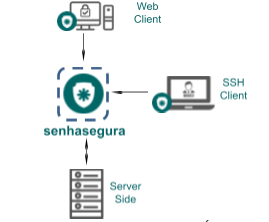
- RDP/SSH: when the access is done by the Terminal Proxy.
- Web: when the access is done through the browser.
The access structure is as follows:
Consumption per connection
| Resource | Usage | RDP/SSH | Web |
|---|---|---|---|
| CPU | Concurrent Connections per core (con./core) | 300 | 30 |
| RAM | Memory per connection (MB/con.) | 20 | 40 |
| HDD | Disk space per time per connection (kB/s/con.) | 3 | 4 |
| NET (Server Side RX/TX) | Network traffic per connection (kbps/con.) | 1 / 3 | 45 / 5 |
| NET (Client Side RX/TX) | Network traffic per connection (kbps/con.) | 0.2 / 1.0 | 10 / 80 |
For customer deployment, the following features are available for the HA (Two Equal Appliances in Cluster):
- Up to xxx simultaneous connections.
- Users: xxx.
- Managed Systems: xx.
- Hours of use per day: xx hours.
- Days of use per week: x Days.
- Retention months: x months.
The minimum hardware requirements would be as follows:
- x minimum vCPU (2.0 GHz) (not shared).
- Minimum RAM x GB (not shared).
- Minimum DD x TB (Not shared, this requirement directly depends on the required retention).
- Minimum 1 network port (1 GbE) (not shared).
For a High Availability (Active-Passive) architecture with two members in a cluster, two machines with the exact Hardware requirements are needed. For an (Active-Active) model, a balancer must be added, which is offered separately when necessary.
For deployment as disaster recovery, you have the following capabilities for a single device:
- Up to x simultaneous connections.
- Users: x.
- Managed Systems: x.
- Hours of use per day: x hours.
- Days of use per week: x days.
- Retention months: x months.
The minimum hardware requirements would be as follows:
- Minimum vCPU x CPU (2.0 GHz) (not shared).
- Minimum RAM x GB (not shared).
- Minimum DD x TB (not shared, this requirement directly depends on the required retention).
- Minimum 1 network port (1 GbE) (not shared).