In this article
About this release
On March 18, 2026, we released version 4.2.1 of Segura® Platform. The release includes 17 changes across 5 modules.
- Release date: 2026-03-18
For information on how to update Segura® Platform, see Update Segura®.
Release highlights
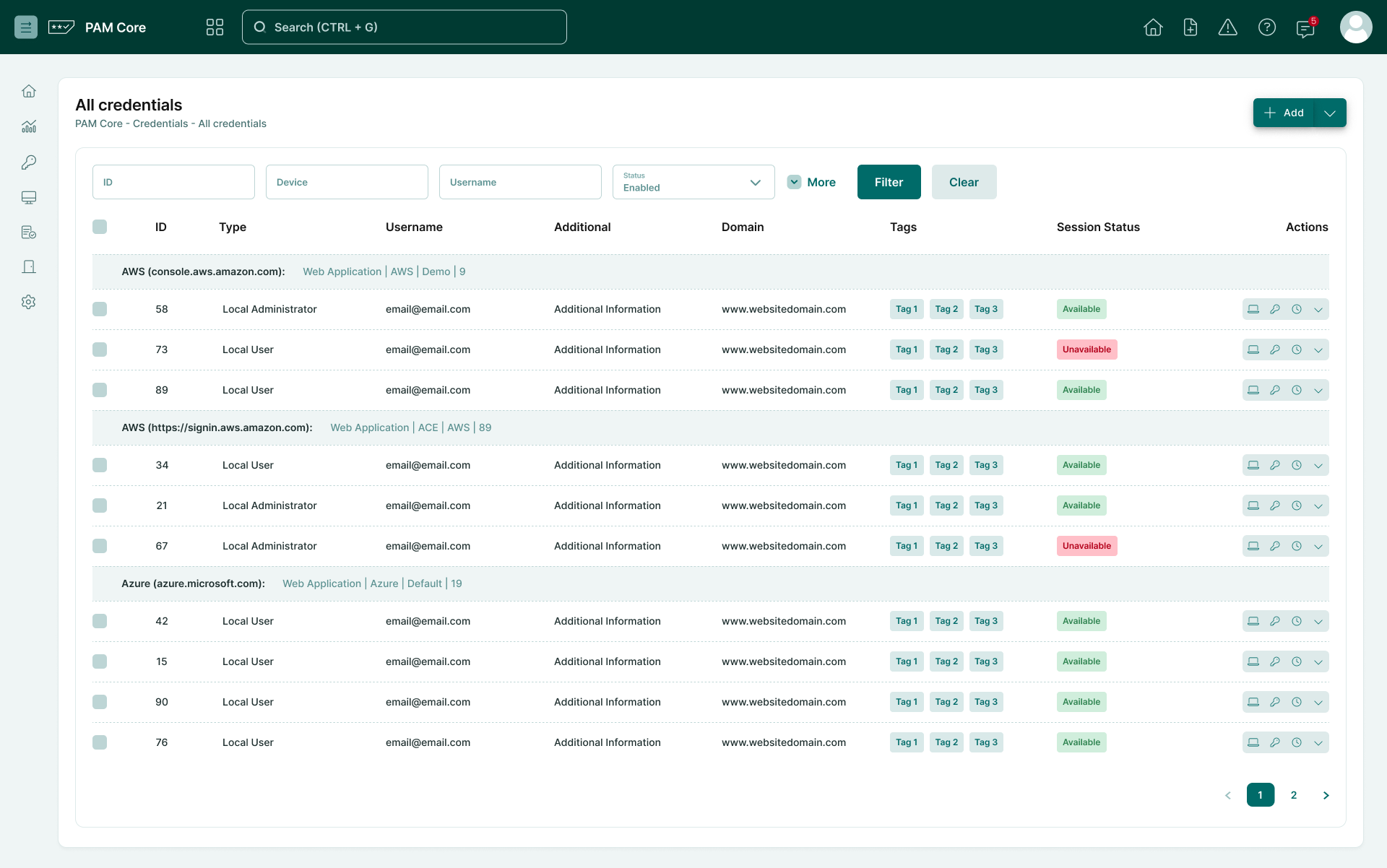
Reporting Interface Usability Improvements
This release introduces several usability improvements to the reporting interface, designed to improve navigation and interaction with large datasets.
What's new
- Fixed horizontal scrollbar at the bottom of the window.
- Sticky action column on the right side of tables.
- Dynamic column width adjustment based on content.
- Tooltips when hovering over action buttons.
- Consistent visual standards applied across reports.
- Full compatibility with light mode and dark mode.
Customer impact
These improvements enhance the usability of large reports, allowing security analysts and auditors to navigate complex datasets more efficiently while maintaining visual context and quick access to actions.
Just-in-Time (JIT) Windows Access with Kerberos
Grant Just-in-Time (JIT) access to Windows environments using Kerberos authentication.
With this feature, PAM can automatically create a temporary Windows user account at the moment access is requested and remove it immediately after the session ends.
What's new
- Automated creation of temporary Windows accounts using Ansible templates.
- Automatic account removal after session completion.
- Kerberos authentication support.
- Integration with Network Connector.
- Support for domain-context environments with locally created users.
How it works
We are providing two new automation templates:
- Windows User Creation Template.
- Windows User Removal Template.
When a user requests access to a Windows server:
- A temporary account is automatically created.
- The user connects using this ephemeral credential.
- Once the session ends, the account is automatically removed.
For more information, refer to How to provision JIT local Windows accounts with Kerberos via Ansible.
Customer impact
This feature eliminates the need for permanent privileged accounts, reducing the risk of credential compromise.
Additionally, it supports Zero Trust strategies by ensuring privileged credentials only exist during the authorized access window, with full traceability for each session.
OAuth2 and HTTP PATCH Support for cURL Executor
The cURL password management executor has been enhanced to support modern API authentication requirements.
What's new
- Support for the OAuth2
scopeparameter inset-oauth2authentication templates. - Support for HTTP PATCH requests.
- Expanded compatibility with REST APIs.
Customer impact
This enhancement enables automated password management integrations with services such as Microsoft Entra ID (formerly Azure AD) and other platforms that require OAuth2 scope parameters and PATCH-based password update operations.
It expands the automation capabilities of the cURL executor, allowing administrators to integrate PAM workflows with enterprise APIs.
For more information, refer to Executors syntax.
Changelog
PAM Core
Added
| Item | Description |
|---|---|
| SSGR-8784 | Added support for Just-in-Time (JIT) ephemeral account provisioning using Kerberos authentication via Ansible. This enhancement enables automated creation and deletion of local Windows accounts through Ansible templates, removing the need for permanent administrative credentials and NTLM authentication. For more information: How to provision JIT local Windows accounts with Kerberos via Ansible. |
Changed
| Item | Description |
|---|---|
| SSGR-9868 | Improved navigation for managing Audited Commands approvers. |
Fixed
| Item | Description |
|---|---|
| SSGR-9830 | Fixed an issue in Database Proxy that caused all database sessions to return an HTTP 500 error during initialization at the /api/proxy/session endpoint. |
| SSGR-8684 | Fixed an issue that caused RDP sessions (via RDP Proxy and Web Proxy) to disconnect unexpectedly when using the copy and paste functionality. |
| SSGR-8797 | Fixed a recurring issue where AdHoc sessions using RemoteApp would fail to start, resulting in an "Upstream error". |
| SSGR-9892 | Fixed error preventing SSH session start on Cisco devices. |
| SSGR-10161 | Fixed session disconnection when navigating folders in WinSCP. |
| SSGR-10042 | Restored the X11 connectivity option for web sessions, which was removed in the previous update. |
| SSGR-9821 | Fixed an issue in the Last used credentials and Most used credentials panels where, when attempting to start remote sessions with domain credentials, the system would direct the connection to the domain controller where the credential was registered, instead of the previously used domain device. |
| SSGR-8728 | Fixed an issue where attempting to upload files larger than 4MB via the Drag and Drop feature on a Linux session using Web Proxy resulted in an error and terminated the session without the file fully uploaded. |
EPM Windows
Fixed
| Item | Description |
|---|---|
| SSGR-8927 | Updated Parameters field documentation for RemoteApp. For more information: Automation for EPM Windows. |
Executions
Changed
| Item | Description |
|---|---|
| SSGR-4769 | Added support for the HTTP PATCH method in the cURL executor and for the scope parameter in the set-oauth2 authentication template, enabling integration with modern APIs to automate password changes via OAuth2. For more information: Executors syntax. |
Framework
Changed
| Item | Description |
|---|---|
| SSGR-6681 | Improved user experience in the Segura® Platform reports. Now, every option in the Actions column have a tooltip, the color scheme was updated according to the Segura® Platform standards and more. |
Fixed
| Item | Description |
|---|---|
| SSGR-9870 | Fixed non-functional Ignore multi-factor authentication setting. |
| SSGR-8792 | Fixed an issue in the report date filters where the invalid format message remained visible even after correcting the entered value. |
| SSGR-8717 | Fixed an issue in the Approval workflow > PAM Core > All requests screen where only requests assigned to the logged-in approver were displayed. The screen now displays all requests from the last 7 days, ensuring broader visibility while maintaining security standards. |
Network Connector
Fixed
| Item | Description |
|---|---|
| SSGR-9889 | Fixed an issue that prevented RDP sessions from starting when the secondary Network Connector took over after the primary went offline. |