In this article
About this release
On June 24, 2026, we released version 4.2.7 of Segura® Platform. The release includes 29 changes across 9 modules.
- Release date: 2026-06-24
- Patch: segura | v4.2.7-1
For information on how to update Segura® Platform, see Update Segura®.
Release highlights
ITSM Connector Engine: Centralized ServiceNow Integration
Version 4.2.7 introduces a new ITSM integration engine, enabling organizations to centrally configure and manage connections to ServiceNow instances within the Segura® Platform.
This capability serves as the foundation for the evolution of ITSM governance workflows across the platform and will be leveraged by multiple modules, including PAM Core, EPM, Domum, DSM, and Certificate Manager.
What's new
- Centralized configuration of ServiceNow connections.
- Support for multiple ServiceNow instances.
- Secure OAuth 2.0 authentication.
- Connection health monitoring (Health Check).
- Automatic retry and fallback mechanisms.
- Secure storage of ServiceNow credentials in the Segura® vault.
- Reusable integration engine across platform modules.
Customer impact
This enhancement eliminates fragmented integrations and enables more consistent ITSM governance across enterprise environments.
Organizations can now operate multiple ServiceNow instances with greater flexibility, simplifying approval workflows, compliance processes, and change management operations on a global scale.
Registration Wizards: Usability and Navigation Enhancements
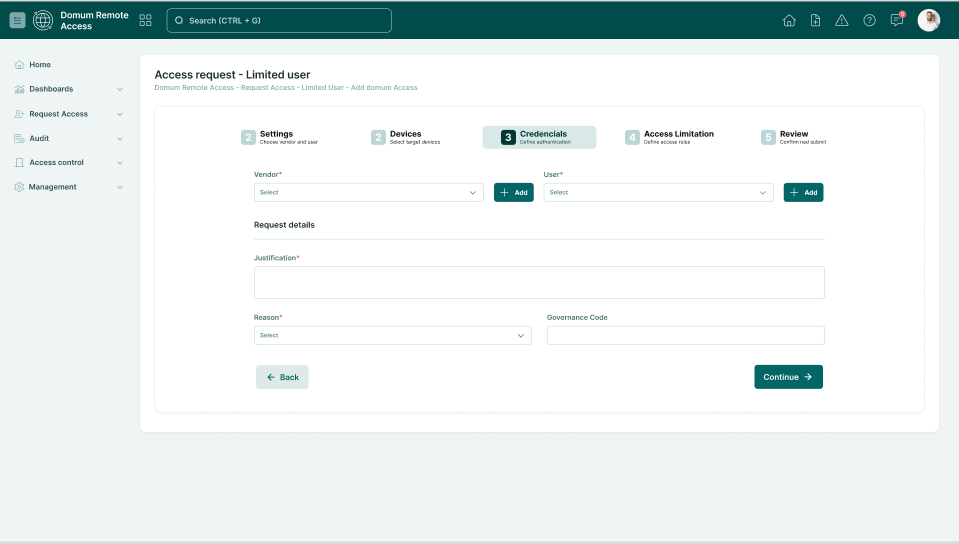
The registration wizard experience has been enhanced to make configuration processes more intuitive, guided, and efficient.
What's new
- Visual numbering of wizard steps.
- Highlighting of the active step.
- Contextual descriptions for each stage.
- Simplified navigation between steps.
- Visual indicators for progress and completion.
- Confirmation prompts when leaving with unsaved changes.
- Improved responsiveness across different screen sizes.
Customer impact
These improvements reduce uncertainty during configuration processes and help users complete registrations with greater confidence and accuracy.
The result is a smoother user experience, fewer operational errors, and reduced dependency on support teams.
Orbit Proactive Alerts for Resources Below Recommended Levels
Version 4.2.7 expands Orbit monitoring capabilities with new alerts designed to identify infrastructure resources operating below recommended thresholds.
What's new
- Continuous monitoring of CPU, memory, and disk space.
- Automatic Orbit incident generation.
- Non-configurable thresholds set to the Segura® Platform minimum hardware requirements.
Customer impact
This capability increases operational visibility and enables administrators to take preventive action before capacity-related issues affect platform availability.
As a result, organizations can reduce operational risks and improve overall platform resilience.
CLM API: New Endpoint for Request Status and Certificate ID Retrieval
Introduced a new Certificate Lifecycle Management (CLM) API endpoint that allows customers to query request status and retrieve the certificate_id once the certificate signing process is completed.
What's new
New API endpoint to track certificate request status and retrieve the signed certificate identifier (certificate_id) after the signing process is completed.
Customer impact
This enhancement provides a reliable mechanism for retrieving the certificate_id in asynchronous certificate signing workflows.
Because the signing process may depend on external validation steps, the certificate request can initially return a Pending status in the immediate response of the POST operation. The new endpoint enables developers to query the request status and retrieve the certificate_id as soon as the status changes to Signed, making automated integrations more predictable, resilient, and easier to manage.
EPM Windows: Rule Precedence for Directory and Registry Policies in Privilege Profiles
Version 4.2.7 enhances EPM Windows Privilege Profiles by introducing rule precedence for Directory and File Control and System Registry Control policies.
As organizations scale privilege management through Privilege Profiles, multiple policies may apply to the same directory, file, or registry object. This enhancement establishes a consistent precedence model, ensuring predictable policy enforcement across endpoints.
What's new
- Rule precedence support for:
- Directory and File Control policies.
- System Registry Control policies.
- Consistent policy evaluation when multiple Privilege Profiles contain rules targeting the same object.
- Improved traceability of policy origin for auditing and troubleshooting purposes.
- Full compatibility with existing Privilege Profile workflows.
Customer impact
This enhancement improves governance and operational scalability by eliminating ambiguity when multiple Privilege Profiles contain overlapping policies.
Organizations can now adopt Privilege Profiles more broadly while maintaining consistent policy enforcement across large Windows environments.
New Audit User Role in DSM
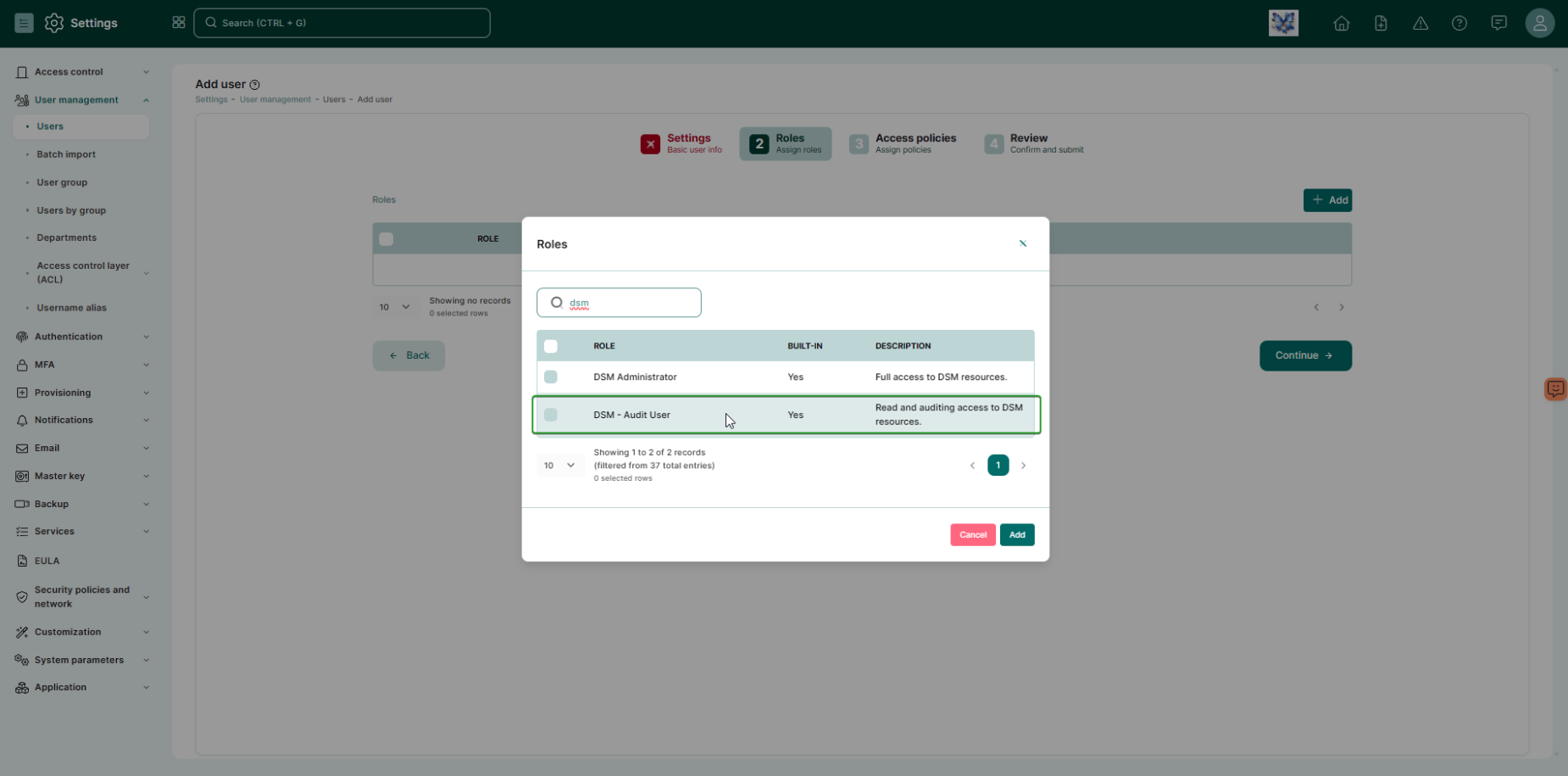
Segura® introduces a dedicated audit role in DSM, enabling access to Audit Tracking menus without requiring broad administrative permissions across the platform.
What's new
- New
DSM - Audit Userrole. - Permission to view logs and reports related to DSM usage.
- Inclusion of
DSM.Applications.ListandDSM.Secrets.Listpermissions to support auditing and report export.
Customer impact
This enhancement removes the need to grant excessive permissions just to enable auditing. As a result, Segura® strengthens the principle of least privilege and improves segregation of duties in regulated environments.
Changelog
API
Added
| Item | Description |
|---|---|
| SSGR-8796 | Added API v2 endpoints to manage AD/LDAP group synchronization configurations. You can create, list, retrieve, update, and delete group sync settings, and activate, deactivate, or trigger a sync enabling automated, end-to-end directory governance without the web interface. See the documentation: LDAP group synchronization. |
| SSGR-9822 | Added API v2 endpoints for full lifecycle management of AD/LDAP servers. You can create, list, retrieve, update, and delete servers, manage activation, and test connections automating directory onboarding at scale without the web interface. See the documentation: LDAP servers. |
| SSGR-9825 | Added API v2 endpoints to manage user groups and access policies. You can perform full CRUD on user groups, manage members and associated access policies as sub-resources, and filter by external_id to support AD/LDAP-synced automation without the web interface. See the documentation: User groups. |
Certificate Manager
Changed
| Item | Description |
|---|---|
| SSGR-3501 | Created the endpoint /api/certificate/request/status/{request_id} to retrieve the certificate ID for a signed request. See the documentation: GET | List a request status by [id]. |
| SSGR-10324 | Improved report titles to better support user navigation through menus, ensuring consistency and usability. The changes are: - Certificates AWS > AWS. - Certificates Azure > Azure. - All Operations > Operations. - SSL/TLS (Reports > Certificates > Certificate without devices) > Certificates without devices. - Automations > Automate flow. - Cloud certificate authorities > Cloud providers. |
Fixed
| Item | Description |
|---|---|
| SSGR-11068 | Fixed an issue where wildcard certificates were not being imported into Certificate Manager after performing a domain discovery. |
Discovery
Fixed
| Item | Description |
|---|---|
| SSGR-10798 | Fixed an issue where, when trying to access a device’s latest debugs, an error 500 was displayed. |
| SSGR-10799 | Fixed an issue where attempting to edit the Plugin field of a newly discovered device resulted in a 500 error. |
Domum Remote Access
Fixed
| Item | Description |
|---|---|
| SSGR-9942 | Fixed an issue in Domum Remote Access where a third-party user's email address could not contain more than two dots in its local part. Addresses such as [email protected] are now accepted. |
| SSGR-10576 | Fixed the access-request flow so it now prompts you to configure a vendor's access policy when one is missing, instead of failing. |
| SSGR-10789 | Fixed the email approval flow so it again detects the responder's sender address. |
| SSGR-10807 | Fixed a security issue in Domum Remote Access where the control governing whether limited third-party users can request their own access was not always enforced. The setting is now enforced, and self-extension of access requires the configured approval workflow. |
| SSGR-10904 | Fixed an error when viewing the access history details of internal and third-party users. |
EPM Windows
Changed
| Item | Description |
|---|---|
| SSGR-9838 | Improved the connection between EPM and the Segura® Platform. Now, if the agent’s authentication token is rejected, it will be automatically renewed, allowing EPM to resume operations without interruption. See the documentation: How to install the EPM Windows agent. |
Fixed
| Item | Description |
|---|---|
| SSGR-10426 | Fixed an issue where the operational system version wasn’t properly displayed in the EPM Windows Admin Web Interface. |
| SSGR-10569 | Fixed an issue where it was not possible to access files within a network shared folder. |
Framework
Added
| Item | Description |
|---|---|
| SSGR-3160 | Added new Orbit alerts that notify administrators when an instance runs with CPU, memory, or disk resources below the recommended levels. The alerts give teams time to take preventive action before the system becomes unavailable. See the documentation: About resource monitoring in Orbit. |
| SSGR-8762 | Added the ITSM Connector Engine, a centralized integration with ServiceNow over REST API. Administrators can configure and manage multiple ServiceNow connections with OAuth 2.0 authentication, health checks, and retry. A single engine is reused across PAM Core, EPM, Domum, DSM, and Certificate Manager for consistent ITSM validation. |
Changed
| Item | Description |
|---|---|
| SSGR-6680 | Applied usability improvements to the registration wizards on the Segura® Platform to make navigation clearer and more guided. Wizards now include step numbering, short descriptions, visual highlighting of the active step, and completion feedback. |
| SSGR-7491 | Improved the scalability and performance of Segregated Parameters when managing large device sets. The Devices side panel and selection modal now support pagination, hostname search, and a total-count header, and you can associate devices in bulk by uploading a downloadable XLSX template. |
MySafe
Fixed
| Item | Description |
|---|---|
| SSGR-10600 | Fixed an issue in the MySafe API that prevented querying secrets by ID when the access key did not have full access permission. |
PAM Core
Fixed
| Item | Description |
|---|---|
| SSGR-9925 | Fixed the behavior of the Session text log report across access protocols and segregated parameter types. |
| SSGR-10285 | Fixed an issue where the downloaded RDP Proxy shortcut file did not support non-ASCII characters, such as the Cyrillic alphabet, causing them to be incorrectly replaced in the credential and device fields when opening the session. |
| SSGR-10423 | Fixed an issue where passwords containing a single quote (') were altered or truncated during bulk credential import. Imported passwords now match the import spreadsheet exactly. |
| SSGR-10543 | Fixed an issue where the livestream of a remote session was displayed as disconnected when viewed from a different node than the one running the session. The livestream can now be viewed from any node in the cluster. |
| SSGR-10605 | Fixed an issue where the download button for a generated Oracle Wallet did not appear under My certificates, even though the wallet was created successfully. The generated wallet is now linked to the user's certificate and available for download. |
| SSGR-10668 | Fixed an issue where RemoteApp script steps were cleared and the configuration was not saved when returning to the editing tab after a period of inactivity. |
| SSGR-11104 | Fixed an issue where processing of recorded SSH and TELNET sessions could fail when a recording contained an empty or truncated data segment. The converter now handles these segments without aborting, so input logs, session playback, and text indexes are generated and the processing queue is no longer interrupted. |
Proxy
Fixed
| Item | Description |
|---|---|
| SSGR-10881 | Fixed an issue where accented and other special characters were replaced by incorrect symbols when pasting text into a Web Proxy with HTTP/HTTPS session. |